This post extends the 3-part ADK Skills series:
ADK skill design patterns are reusable structural templates for organizing SKILL.md files — the markdown-based instruction format that tells Google ADK agents how to use tools, generate content, or orchestrate multi-step workflows. In Parts 1-3 of this series, I covered the foundations — what agent skills are, how Google ADK’s SkillToolset implements progressive disclosure, and how to build self-extending agents with meta-skills. But one question kept coming up in my own projects: I know how to create a skill, but how should I structure the content inside it?
A skill that wraps FastAPI conventions looks nothing like a skill that runs a 4-step documentation pipeline, yet both use the same SKILL.md format. The Agent Skills specification
defines the container — SKILL.md frontmatter, references/, assets/, scripts/ directories — but says nothing about what goes inside. That’s a content design problem, not a format problem.
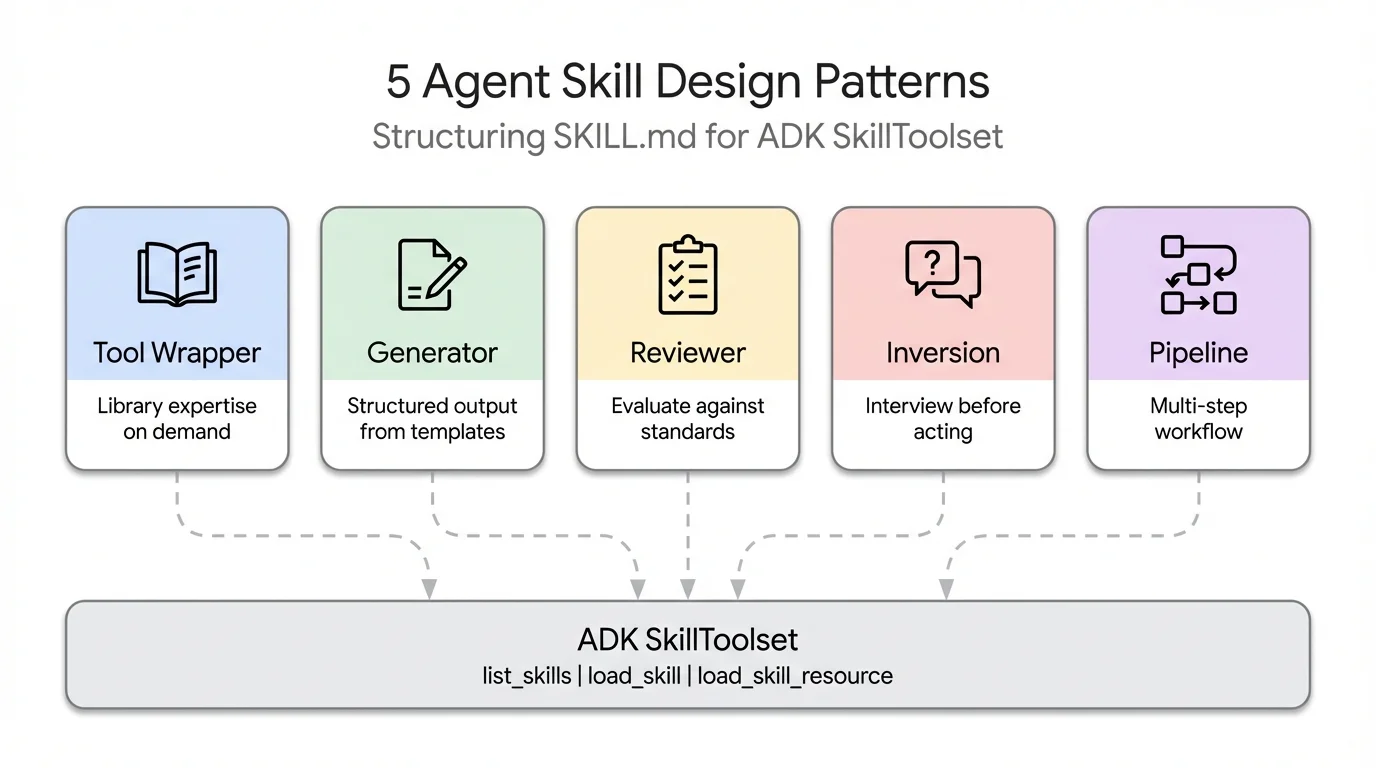
Five patterns keep surfacing. I’ve seen them across Claude Code’s bundled skills , community repos on skills.sh , real-world projects, and even in a recent arXiv paper that formally catalogued seven system-level skill design patterns. This post names the five most practical ones, shows each in ADK with working code, and helps you pick the right one for your use case.
By the end of this post, you’ll know how to:
- Use a Tool Wrapper to make your agent an instant expert on any library or framework
- Use a Generator to produce consistently structured documents from a reusable template
- Use a Reviewer to have your agent score code against a checklist, grouped by severity
- Use an Inversion to flip the conversation — the agent asks you questions before acting
- Use a Pipeline to enforce a strict step-by-step workflow with checkpoints between stages
Note
- Tool Wrapper — like a cheat sheet for a library; makes your agent apply its conventions only when relevant
- Generator — like a form your agent fills in; produces consistently structured documents every time
- Reviewer — like a rubric; scores submitted code against a checklist with findings grouped by severity
- Inversion — the agent interviews you first; asks structured questions before producing any output
- Pipeline — like a recipe with sign-offs; enforces a strict step-by-step workflow so nothing gets skipped
- All five patterns compose — a Pipeline can include a Reviewer step; a Generator can use Inversion for input gathering
One SKILL.md Format, Many Use Cases
The Agent Skills standard has been adopted by over 30 agent tools — Claude Code, Gemini CLI, GitHub Copilot, Cursor, JetBrains Junie, and many more. Every skill follows the same directory layout:
skill-name/
├── SKILL.md          ← YAML frontmatter + markdown instructions (required)
├── references/       ← style guides, checklists, conventions (optional)
├── assets/           ← templates and output formats (optional)
└── scripts/          ← executable scripts (optional)
I covered the format in detail in Part 2 , so I won’t repeat it here.
The format tells you how to package a skill. It doesn’t tell you how to design the content. Should the instructions be a checklist? A workflow? A set of questions? Should references hold style guides, templates, or lookup tables? The answer depends on what your skill is trying to do, and that’s where patterns come in.
Each of the five patterns in this post uses the same SKILL.md format but structures the content differently — different instruction styles, different resource types, different relationships between L2 (instructions) and L3 (references/assets). If you need a refresher on the three progressive disclosure levels, see Part 1’s explanation .
Quick Recap: SkillToolset and the Three Levels
ADK’s SkillToolset
implements progressive disclosure through three auto-generated tools. I covered the internals in Part 2
, so here’s just the quick version: list_skills shows skill names and descriptions (L1), load_skill fetches full instructions (L2), and load_skill_resource
loads reference files and templates on demand (L3). The agent pays ~100 tokens per skill at startup, then loads the rest only when needed.
For the pattern examples in this post, all five skills are loaded into a single SkillToolset. The agent decides which to activate based on the user’s request.
# agent.py
import pathlib

from google.adk import Agent
from google.adk.skills import load_skill_from_dir
from google.adk.tools.skill_toolset import SkillToolset

SKILLS_DIR = pathlib.Path(__file__).parent / "skills"

skill_toolset = SkillToolset(
    skills=[
        load_skill_from_dir(SKILLS_DIR / "api-expert"),       # Pattern 1: Tool Wrapper
        load_skill_from_dir(SKILLS_DIR / "report-generator"), # Pattern 2: Generator
        load_skill_from_dir(SKILLS_DIR / "code-reviewer"),    # Pattern 3: Reviewer
        load_skill_from_dir(SKILLS_DIR / "project-planner"),  # Pattern 4: Inversion
        load_skill_from_dir(SKILLS_DIR / "doc-pipeline"),     # Pattern 5: Pipeline
    ],
)

root_agent = Agent(
    model="gemini-2.5-flash",
    name="pattern_demo_agent",
    instruction="Load relevant skills before acting on any user request.",
    tools=[skill_toolset],
)
The description field in each skill’s frontmatter is the most important line. It’s the agent’s search index — if the description is vague, the agent won’t activate the skill when it should. Each pattern below shows how to write descriptions that trigger reliably.
Pattern 1: Tool Wrapper — Teach the Agent a Library
A Tool Wrapper is an agent skill that packages a library or tool’s conventions, best practices, and coding standards into on-demand knowledge the agent loads when working with that technology. It is the simplest SKILL.md pattern — instructions plus reference files, no templates or scripts.
A Tool Wrapper skill packages a library or tool’s conventions into on-demand knowledge. The agent becomes a domain expert when the skill is loaded. Think FastAPI conventions, Terraform patterns, security policies, or database query best practices.
This is the simplest pattern. No templates, no scripts — just instructions telling the agent what rules to follow, plus references/ holding the detailed convention docs.

# skills/api-expert/SKILL.md
---
name: api-expert
description: FastAPI development best practices and conventions. Use when building, reviewing, or debugging FastAPI applications, REST APIs, or Pydantic models.
metadata:
  pattern: tool-wrapper
  domain: fastapi
---

You are an expert in FastAPI development. Apply these conventions to the user's code or question.

## Core Conventions

Load 'references/conventions.md' for the complete list of FastAPI best practices.

## When Reviewing Code
1. Load the conventions reference
2. Check the user's code against each convention
3. For each violation, cite the specific rule and suggest the fix

## When Writing Code
1. Load the conventions reference
2. Follow every convention exactly
3. Add type annotations to all function signatures
4. Use Annotated style for dependency injection
The references/conventions.md file holds the actual rules — naming conventions, route definitions, error handling patterns, async vs sync guidance. The agent loads this file only when it activates the skill, keeping the baseline context small.
The description here is critical. It includes specific keywords — “FastAPI”, “REST APIs”, “Pydantic models” — that match what developers actually type. A description like “Helps with APIs” would rarely trigger because it’s too generic.
When to use Tool Wrapper
When you want your agent to apply consistent, expert-level conventions for a specific library, SDK, or internal system. This is the most widely adopted pattern — several engineering teams have open-sourced theirs as reference:
- Vercel
react-best-practices— 40+ React and Next.js performance rules from Vercel Engineering, organized by impact level (CRITICAL → LOW), loaded on demand when the agent works on React or Next.js code - Supabase
supabase-postgres-best-practices— Postgres optimization guidelines across 8 categories (query performance, connection management, RLS, security) structured as on-demand references - Google
gemini-api-dev— Google’s official Tool Wrapper for the Gemini API, encoding best practices for building Gemini-powered apps, installable directly into any skills-compatible agent - Google
adk-core-skills— Google’s official ADK development skills: 6 skills covering the ADK developer guide, cheatsheet, evaluation, deployment, observability, and scaffolding. Installable vianpx skills add google/adk-docs -y -ginto any coding agent (Gemini CLI, Claude Code, Cursor). These are Tool Wrappers that teach coding agents how to write ADK code correctly — the ADK team dogfooding the same SKILL.md format thatSkillToolsetuses at runtime.
The pattern works equally well for internal tools: write a google-adk-conventions skill that encodes your team’s ADK patterns — which model to default to, how to name agents, how to wire toolsets, how to handle errors — and every ADK agent your team builds follows the same conventions automatically, without repeating them in every system prompt.
# skills/google-adk-conventions/SKILL.md
---
name: google-adk-conventions
description: Google ADK coding conventions and best practices. Use when building,
  reviewing, or debugging any ADK agent, tool, or multi-agent system.
metadata:
  pattern: tool-wrapper
  domain: google-adk
---

You are an ADK expert. Apply these conventions when writing or reviewing ADK code.

## Agent Naming
- The `name` field must match the agent's directory name exactly (`search-agent/` → `name="search-agent"`)
- Use lowercase, hyphen-separated names: `search-agent`, not `SearchAgent`

## Model Selection
- Default to `gemini-2.5-flash` for most tasks (fast, cost-efficient)
- Use `gemini-2.5-pro` only for complex multi-step reasoning
- Define model as a constant, never hardcode inline: `MODEL = "gemini-2.5-flash"`

## Tool Definitions
Load `references/tool-conventions.md` for the complete rules. Key points:
- Names: verb-noun, snake_case — `get_weather`, `search_documents`, not `run` or `doStuff`
- Always add type hints: `city: str`, `user_id: int`
- No default parameter values — the LLM must derive or request all inputs
- Docstring is the LLM's primary manual — be precise, don't describe `ToolContext`

## Multi-Agent Systems
- The `description` field on sub-agents is your routing API — be specific, not generic
- Only one built-in tool (Google Search, Code Exec) per root agent
- Group related tools into a `BaseToolset` subclass when an agent has 5+ tools
Note
The
metadatafield in frontmatter is adict[str, str]— ADK stores it but doesn’t enforce any schema. I use it to tag skills by pattern and domain, which helps when you have 20+ skills and need to audit them.
Pattern 2: Generator — Produce Structured Output
A Generator skill produces documents, reports, or configurations by filling a reusable template. Unlike Tool Wrapper, it uses both optional directories: assets/ holds the output template (the structure to fill in), and references/ holds the style guide (the quality rules to follow). The instructions orchestrate the process — load the style guide, load the template, gather inputs, fill it in.

# skills/report-generator/SKILL.md
---
name: report-generator
description: Generates structured technical reports in Markdown. Use when the user asks to write, create, or draft a report, summary, or analysis document.
metadata:
  pattern: generator
  output-format: markdown
---

You are a technical report generator. Follow these steps exactly:

Step 1: Load 'references/style-guide.md' for tone and formatting rules.

Step 2: Load 'assets/report-template.md' for the required output structure.

Step 3: Ask the user for any missing information needed to fill the template:
- Topic or subject
- Key findings or data points
- Target audience (technical, executive, general)

Step 4: Fill the template following the style guide rules. Every section in the template must be present in the output.

Step 5: Return the completed report as a single Markdown document.
The template in assets/report-template.md defines the exact sections every report must have — Executive Summary, Background, Methodology, Findings, Summary Table, Recommendations, Next Steps. The style guide in references/style-guide.md controls tone (“third person, active voice”), formatting (“H2 for sections, H3 for subsections”), and quality (“Executive Summary under 150 words, no vague Next Steps”).
The agent loads both files via load_skill_resource when it activates the skill. The template enforces structure, the style guide enforces quality. Swap either file to change the output without touching the instructions.
When to use Generator
When the output needs to follow a fixed structure every time — consistency matters more than creativity. Common real-world uses:
- Technical reports — Executive Summary, Methodology, Findings, Recommendations, always in the same order regardless of topic
- API documentation — every endpoint documented with the same sections: description, parameters, request/response examples, error codes
- Commit messages — enforce Conventional Commits format (
feat:,fix:,docs:) from a template, so every commit in the repo reads consistently - ADK agent scaffolding — generate the standard
agent.py+__init__.py+.envstructure for a new ADK project from a template, pre-wired with your team’s model constant and instruction style
Pattern 3: Reviewer — Evaluate Against a Standard
A Reviewer skill evaluates code, content, or artifacts against a checklist stored in references/, producing a scored findings report grouped by severity. The key design insight: separating WHAT to check (the checklist file) from HOW to check (the review protocol in the instructions). Swap references/review-checklist.md for references/security-checklist.md and you get a completely different review from the same skill structure.

# skills/code-reviewer/SKILL.md
---
name: code-reviewer
description: Reviews Python code for quality, style, and common bugs. Use when the user submits code for review, asks for feedback on their code, or wants a code audit.
metadata:
  pattern: reviewer
  severity-levels: error,warning,info
---

You are a Python code reviewer. Follow this review protocol exactly:

Step 1: Load 'references/review-checklist.md' for the complete review criteria.

Step 2: Read the user's code carefully. Understand its purpose before critiquing.

Step 3: Apply each rule from the checklist to the code. For every violation found:
- Note the line number (or approximate location)
- Classify severity: error (must fix), warning (should fix), info (consider)
- Explain WHY it's a problem, not just WHAT is wrong
- Suggest a specific fix with corrected code

Step 4: Produce a structured review with these sections:
- **Summary**: What the code does, overall quality assessment
- **Findings**: Grouped by severity (errors first, then warnings, then info)
- **Score**: Rate 1-10 with brief justification
- **Top 3 Recommendations**: The most impactful improvements
The references/review-checklist.md contains the actual rules organized by category — Correctness (severity: error), Style (severity: warning), Documentation (severity: info), Security (severity: error), Performance (severity: info). Each category has specific, checkable items: “No mutable default arguments”, “Functions under 30 lines”, “No wildcard imports.”
When I tested this against a function with three intentional bugs — PascalCase naming, a mutable default argument, and a bare except: — the agent loaded the skill, fetched the checklist, and caught all three. It classified the mutable default as an error (correct — it’s a bug), the naming as a warning (correct — it’s style), and produced a scored report. The checklist drove the behavior, not the agent’s pre-training.
When to use Reviewer
Anywhere a human reviewer works from a checklist — a Reviewer skill can encode it and apply it consistently. Common real-world uses:
- Code review — catch mutable defaults, missing type hints, bare
except:blocks against your team’s style rules; Giorgio Crivellari demonstrated this with an ADK governance skill that lifted code quality scores from 29% to 99% - Security audit — run OWASP Top 10 checks against submitted code, classifying findings by severity before any human review
- Editorial review — check blog posts or docs against a house style guide (tone, heading structure, word count, forbidden phrases)
- ADK agent review — validate a new agent against your team’s
google-adk-conventions: naming, model constant, tool docstrings, description field quality
Pattern 4: Inversion — The Skill Interviews You
Inversion flips the typical agent interaction: instead of the user driving the conversation, the skill instructs the agent to ask structured questions through defined phases before producing any output. The agent won’t act until it has gathered all the information it needs. No special framework support required — Inversion is purely an instruction-authoring pattern, relying on explicit gates like DO NOT start building until all phases are complete to hold the agent back.

# skills/project-planner/SKILL.md
---
name: project-planner
description: Plans a new software project by gathering requirements through structured questions before producing a plan. Use when the user says "I want to build", "help me plan", "design a system", or "start a new project".
metadata:
  pattern: inversion
  interaction: multi-turn
---

You are conducting a structured requirements interview. DO NOT start building or designing until all phases are complete.

## Phase 1 — Problem Discovery (ask one question at a time, wait for each answer)

Ask these questions in order. Do not skip any.

- Q1: "What problem does this project solve for its users?"
- Q2: "Who are the primary users? What is their technical level?"
- Q3: "What is the expected scale? (users per day, data volume, request rate)"

## Phase 2 — Technical Constraints (only after Phase 1 is fully answered)

- Q4: "What deployment environment will you use?"
- Q5: "Do you have any technology stack requirements or preferences?"
- Q6: "What are the non-negotiable requirements? (latency, uptime, compliance, budget)"

## Phase 3 — Synthesis (only after all questions are answered)

1. Load 'assets/plan-template.md' for the output format
2. Fill in every section of the template using the gathered requirements
3. Present the completed plan to the user
4. Ask: "Does this plan accurately capture your requirements? What would you change?"
5. Iterate on feedback until the user confirms
The phased structure is what makes Inversion work. Phase 1 must complete before Phase 2 starts. Phase 3 only triggers after all questions are answered. The DO NOT start building or designing until all phases are complete instruction at the top is the critical gate — without it, agents tend to jump to conclusions after the first answer.
The assets/plan-template.md anchors the synthesis step. It defines sections for Problem Statement, Target Users, Scale Requirements, Technical Architecture, Non-Negotiable Requirements, Proposed Milestones, Risks & Mitigations, and Decision Log. The agent fills this template using the interview answers, producing a consistent output regardless of how the conversation went.
When to use Inversion
Anywhere the agent needs context from the user before it can do useful work — it prevents the most common agent failure mode: generating a detailed plan based on assumptions instead of asking. Common real-world uses:
- Requirements gathering — interview a user about a project before producing a technical design, ensuring the plan reflects actual constraints rather than guesses
- Diagnostic interviews — walk through a structured troubleshooting checklist (environment, version, error message, reproduction steps) before suggesting a fix
- Configuration wizards — gather deployment preferences (cloud provider, region, scaling requirements) before generating infrastructure config
- ADK agent design — before scaffolding a new ADK agent, interview the user: what tools does it need, which model, is it part of a multi-agent system, what are the routing constraints?
Pattern 5: Pipeline — Enforce a Multi-Step Workflow
A Pipeline skill defines a sequential workflow where each step must complete before the next begins, with explicit gate conditions that prevent the agent from skipping validation. It’s the most complex pattern — unlike Tool Wrapper which just loads references, Pipeline uses all three optional directories (references/, assets/, scripts/) and adds control flow between steps. The instructions themselves are the workflow definition.

# skills/doc-pipeline/SKILL.md
---
name: doc-pipeline
description: Generates API documentation from Python source code through a multi-step pipeline. Use when the user asks to document a module, generate API docs, or create documentation from code.
metadata:
  pattern: pipeline
  steps: "4"
---

You are running a documentation generation pipeline. Execute each step in order. Do NOT skip steps or proceed if a step fails.

## Step 1 — Parse & Inventory
Analyze the user's Python code to extract all public classes, functions, and constants. Present the inventory as a checklist. Ask: "Is this the complete public API you want documented?"

## Step 2 — Generate Docstrings
For each function lacking a docstring:
- Load 'references/docstring-style.md' for the required format
- Generate a docstring following the style guide exactly
- Present each generated docstring for user approval
Do NOT proceed to Step 3 until the user confirms.

## Step 3 — Assemble Documentation
Load 'assets/api-doc-template.md' for the output structure. Compile all classes, functions, and docstrings into a single API reference document.

## Step 4 — Quality Check
Review against 'references/quality-checklist.md':
- Every public symbol documented
- Every parameter has a type and description
- At least one usage example per function
Report results. Fix issues before presenting the final document.
The gate conditions are the defining feature. “Do NOT proceed to Step 3 until the user confirms” prevents the agent from assembling documentation with unreviewed docstrings. “Do NOT skip steps or proceed if a step fails” at the top enforces the sequential constraint. Without these gates, agents tend to barrel through all steps and present a final result that skipped validation.
Each step loads different resources. Step 2 loads references/docstring-style.md (Google-style docstring format). Step 3 loads assets/api-doc-template.md (the output structure with Table of Contents, Classes, Functions, Constants sections). Step 4 loads references/quality-checklist.md (completeness and quality rules). The agent only pays context tokens for the resources it needs at each step.
When to use Pipeline
Any multi-step process where steps have dependencies and order matters — if skipping a step would produce incorrect or unvalidated output, use Pipeline. Common real-world uses:
- Documentation generation — parse code → generate docstrings (with user approval) → assemble docs → quality check, with gates between each stage
- Data processing — validate input → transform → enrich → write output, where each step must succeed before the next runs
- Deployment workflows — run tests → build artifact → deploy to staging → smoke test → promote to production, with human confirmation gates
- ADK agent onboarding — interview user (Inversion) → scaffold files (Generator) → validate against conventions (Reviewer), composing three patterns into one Pipeline
Choosing the Right ADK Skill Pattern
Each pattern answers a different question. Use this table to find the right one, then follow the decision tree below if you’re still unsure.
| Pattern | Use when… | Directories used | Complexity |
|---|---|---|---|
| Tool Wrapper | Agent needs expert knowledge about a specific library or tool | references/ | Low |
| Generator | Output must follow a fixed template every time | assets/ + references/ | Medium |
| Reviewer | Code or content needs evaluation against a checklist | references/ | Medium |
| Inversion | Agent must gather context from the user before acting | assets/ | Medium — multi-turn |
| Pipeline | Workflow has ordered steps with validation gates between them | references/ + assets/ + scripts/ | High |
Patterns compose. A Pipeline can include a Reviewer step — the doc-pipeline’s Step 4 loads quality-checklist.md and evaluates the assembled document against it, which is the Reviewer pattern embedded inside a Pipeline. A Generator can use Inversion to gather inputs before producing output. A Tool Wrapper can be embedded as a reference file inside a Pipeline skill. The arXiv paper “SoK: Agentic Skills”
(February 2026) found that production systems typically combine 2-3 patterns, with the most common combination being metadata-driven disclosure (our Tool Wrapper) plus marketplace distribution.
If you’re unsure which pattern fits, start with this decision tree:

The ADK Skills Ecosystem
You don’t have to write every skill from scratch. The Agent Skills standard
means any skill authored for Claude Code, Gemini CLI, Cursor, or 30+ compatible agents
loads in ADK with load_skill_from_dir(). Here’s where to find them:
- skills.sh
— the largest community marketplace (86,000+ installs); browse and install any skill with
npx skills add <owner/repo> - google-gemini/gemini-skills — Google’s official Tool Wrapper skills for the Gemini API, covering best practices for building Gemini-powered apps
- google/adk-docs/skills
— Google’s official ADK development skills (dev guide, cheatsheet, eval, deploy, observability, scaffold) — install via
npx skills add google/adk-docs -y -g - vercel-labs/agent-skills — Vercel’s official skills for React, Next.js, AI SDK, and deployment patterns (22K stars)
- supabase/agent-skills — Supabase’s Postgres optimization guidelines across query performance, RLS, and connection management
- anthropics/skills — production-grade document skills for PowerPoint, Excel, Word, and PDF generation (86,500 stars)
- VoltAgent/awesome-agent-skills — curated collection of official skills from leading engineering teams
- kodustech/awesome-agent-skills — skills focused on architecture and design patterns
To load any of these in ADK, clone or copy the skill directory and point load_skill_from_dir at it:
# Loading a community skill from any skills-compatible source
community_skill = load_skill_from_dir(
    pathlib.Path(__file__).parent / "skills" / "community-skill-name"
)
Note
The directory name must match the
namefield in the skill’s SKILL.md frontmatter — ADK enforces this at load time. Part 2 covers the exact error behavior.
Warning
Use external skills at your own risk. Community and third-party skills are not reviewed or endorsed by Google or the ADK team. Before loading any external skill, review its SKILL.md instructions, reference files, and scripts for unintended behavior, data exfiltration, or prompt injection. You are responsible for auditing any skill you add to your agent.
ADK Core Skills: Google’s Official Development Skills
Google publishes official skills that teach coding agents how to write ADK code:
| Skill | What It Teaches |
|---|---|
adk-dev-guide | ADK architecture, agent types, tool definitions, callbacks |
adk-cheatsheet | Quick-reference patterns for common ADK tasks |
adk-eval-guide | Writing and running agent evaluations |
adk-deploy-guide | Deploying ADK agents to Cloud Run and Vertex AI |
adk-observability-guide | Tracing, logging, and monitoring ADK agents |
adk-scaffold | Project scaffolding and directory structure |
Install all six globally with one command:
npx skills add google/adk-docs -y -g
These are Tool Wrapper skills — the same pattern covered above
. They follow the agentskills.io specification, which means they work in Gemini CLI, Claude Code, Cursor, and any compatible agent. The ADK team dogfoods the same SKILL.md format that SkillToolset
uses at runtime — one spec powering both the development workflow (coding agents writing ADK code) and the production runtime (deployed agents loading skills on demand).
Frequently Asked Questions
Can I use skills developed in ADK with other coding agents?
Yes — skills you develop inside ADK follow the agentskills.io specification
, the same open standard used by Gemini CLI, Antigravity, Claude Code, and OpenAI Codex. A skill authored in ADK can be loaded by any of these agents. The cross-client convention is to store shared skills in <project>/.agents/skills/ or ~/.agents/skills/. For externally authored skills (from community repos or other teams), check each agent’s documentation for how to import and load them.
How many skills can one agent have?
No hard limit in the current ADK release (v1.25.0+, marked Experimental). SkillToolset
injects skill descriptions (~100 tokens each) on every LLM call via process_llm_request()
. At 50 skills, that’s roughly 5,000-7,500 tokens of overhead per call (including XML wrapping) — still manageable for models with 128K+ context windows. Performance degrades gracefully as skill count increases.
Can patterns be combined?
Yes. A Pipeline skill can include Reviewer steps (the doc-pipeline’s Step 4 is a quality review). A Generator can use Inversion to gather inputs before producing output. The arXiv paper found that production systems use a median of 2 patterns per skill, with the most common combination being metadata-driven disclosure plus marketplace distribution.
What about executable scripts in the scripts/ directory?
Script execution via the scripts/ directory is not yet supported in the current pip release — the ADK docs
list it as a known limitation. When it ships, it will enable Pipeline and Tool Wrapper patterns with executable Python and shell scripts running directly from the skill directory. I previewed this capability in Part 3’s “What’s Next”
.
Where should I store skills — project level or user level?
Project-level (<project>/.agents/skills/) for team-shared skills that live with the codebase. User-level (~/.agents/skills/) for personal skills across all projects. ADK uses explicit load_skill_from_dir() paths — you choose the directory, and the convention from the Agent Skills spec
handles cross-client interoperability.
How do I test a skill’s effectiveness?
The agentskills.io specification defines an evaluation methodology
: create test cases in evals/evals.json, run each case with and without the skill, and measure the pass rate delta. The delta tells you exactly what the skill buys versus what it costs in context tokens.
What is the difference between ADK skills and tools?
Tools give agents the ability to take actions — call APIs, read files, query databases. Skills teach agents when and how to use those tools effectively. A tool is “call the weather API.” A skill is “when the user asks about travel, check weather for each destination, compare results, and format as an itinerary.” Skills compose on top of tools — see Part 1’s explanation for the full distinction.
How do SKILL.md files work in Google ADK?
SKILL.md files are markdown documents with YAML frontmatter (name, description) and structured instructions. ADK’s SkillToolset
loads them via load_skill_from_dir(), auto-generates three tools (list_skills, load_skill, load_skill_resource), and uses progressive disclosure to load full instructions only when relevant to the user’s query. See Part 2
for the complete format reference.
Which SKILL.md design pattern should I start with?
Start with Tool Wrapper — it’s the simplest pattern (just instructions plus reference files) and the most widely adopted. Wrap your team’s coding conventions or a library’s best practices into a SKILL.md with a references/ directory. Graduate to Generator or Reviewer when you need structured output or evaluation. The decision tree
above can help you pick the right pattern.
What are ADK Core Skills and how do they relate to SkillToolset?
ADK Core Skills are official skills
published by Google that teach coding agents (Gemini CLI, Claude Code, Cursor) how to write ADK code correctly. They follow the Tool Wrapper pattern described in this post and use the agentskills.io specification. SkillToolset is the runtime API that equips deployed production agents with skills. Both use the same SKILL.md format: Core Skills help you build ADK agents; SkillToolset helps your agents run with modular knowledge.
What’s Next for ADK Skills
Clone the companion repo
, run adk web .
, and try each pattern. Start with the Reviewer — submit some Python code and watch the agent load the checklist and produce a scored review. Then swap references/review-checklist.md for your own team’s coding standards.
If you’re new to ADK Skills, start with Part 1 for foundations. If you want skills that create other skills, Part 3 covers the meta-skill pattern. This post is part of the Agent Engineering series by Lavi Nigam — see more on ADK for related posts.
References
- Skills for ADK Agents — Official ADK documentation for SkillToolset and progressive disclosure
- Agent Skills Specification — The open standard defining SKILL.md format, adopted by 30+ agent tools
- What Are Agent Skills? — Conceptual overview and adoption list from agentskills.io
- Part 1: Progressive Disclosure with SkillToolset — Foundations: L1/L2/L3 levels, inline skills
- Part 2: File-Based, External Skills, and SkillToolset Internals — SKILL.md format, load_skill_from_dir, multi-skill loading
- Part 3: Skills That Write Skills — Meta-skill pattern, self-extending agents
- Companion Code Repository — Working code for all five patterns in this post
skill_toolset.py— SkillToolset source with auto-generated toolsskills_agentsample — Official ADK sample with inline + file-based skills- SoK: Agentic Skills — Beyond Tool Use in LLM Agents — arXiv paper (February 2026) identifying 7 system-level skill design patterns
- skills.sh — Agent Skills Directory — Community marketplace with 86,000+ total installs
- Anthropic Skills Repository — 86,500 stars, production-grade document skills
- google-gemini/gemini-skills — Google’s official Tool Wrapper skills for the Gemini API
- vercel-labs/agent-skills — Vercel’s official skills for React, Next.js, and deployment patterns
- supabase/agent-skills — Supabase’s Postgres optimization guidelines as a Tool Wrapper skill
- awesome-agent-skills (VoltAgent) — Curated collection from leading development teams
- awesome-agent-skills (kodustech) — Architecture and design pattern skills
- Using Scripts in Skills — Script design patterns for agentic use
- Evaluating Skills — Eval methodology: test cases, pass rate delta
- Giorgio Crivellari — I Built an Agent Skill for Google’s ADK — Reviewer pattern achieving 29% to 99% code quality
- Coding with AI — ADK Core Skills — Official tutorial for using ADK skills with coding agents
- ADK Core Skills (GitHub) — Source for the official ADK development skills
Companion Repository
Clone the repo and run all five pattern examples locally with adk web .
ADK Skills Documentation
Official guide for SkillToolset, progressive disclosure, and skill loading
Agentic Skills — Beyond Tool Use in LLM Agents
Research paper identifying 7 system-level skill design patterns across production agent systems
