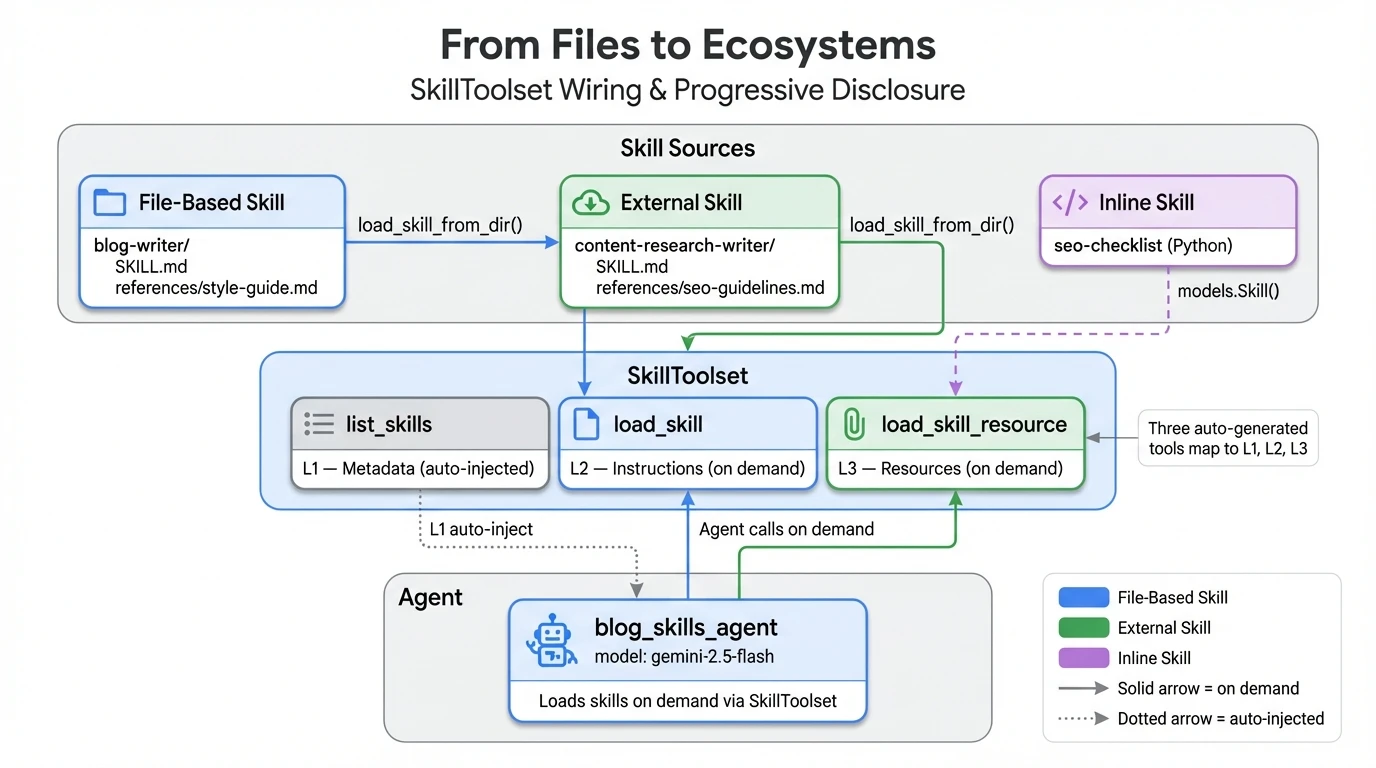
This is Part 2 of a 3-part series on building ADK agents with reusable skills.
In Part 1, we covered progressive disclosure — the L1/L2/L3 pattern that keeps agent context small — and built an inline SEO checklist skill in Python. Inline skills are fast to write, but the knowledge lives only in your code. This post moves beyond Python strings into ADK skills that live on disk, come from community repos, and get wired into a working agent.
By the end of this post, you’ll know how to:
- Load file-based skills from directories with SKILL.md and reference documents
- Integrate external skills from community repositories like awesome-claude-skills
- Wire all skills into a single
SkillToolsetand understand its three auto-generated tools - See multi-skill loading in action with ADK Web
Tip
- File-based skills store knowledge as SKILL.md files with YAML frontmatter, making skills reusable and version-controllable
- External skills load from community repos (like awesome-claude-skills), letting you import pre-built expertise
SkillToolsetauto-generates three tools from any skill collection:list_skills,get_skill_details, andload_skill_resource- ADK validates skill names at import time — duplicate names raise a
ValueErrorimmediately, not at runtime
Pattern 2: File-Based ADK Skills
A file-based skill in ADK is a skill stored as a directory containing a SKILL.md file with YAML frontmatter (name and description) and Markdown instructions, plus optional references/, assets/, and scripts/ subdirectories for L3 resources.
The SEO checklist worked as an inline skill because it was self-contained — nine rules, no external files. The blog writer skill needs more: a style guide with voice rules, formatting conventions, and anti-patterns. That reference document doesn’t belong inline as a Python string. This is where file-based skills pick up.
A file-based skill lives in its own directory with a SKILL.md file and optional subdirectories for references, assets, and scripts. The SKILL.md starts with YAML frontmatter, followed by Markdown instructions.
# skills/blog-writer/SKILL.md
---
name: blog-writer
description: Blog post writing skill with structure templates and style guidelines.
  Guides the agent through writing well-structured, engaging technical blog posts
  with proper formatting, section flow, and reader engagement techniques.
---

# Blog Writer Instructions

When asked to write a blog post, follow these steps:

## Step 1: Structure
Use `load_skill_resource` to read `references/style-guide.md` for the writing style rules.

## Step 2: Outline First
Before writing, create a brief outline with:
- **Hook**: Opening that grabs attention
- **Context**: Why this topic matters now
- **Core sections**: 3-5 sections that build on each other
- **Takeaway**: What the reader walks away knowing
...
The design splits knowledge across two layers. The SKILL.md instructions (L2) tell the agent what steps to follow. The references/style-guide.md file (L3) provides the detailed knowledge for each step — voice guidelines, formatting conventions, anti-patterns to avoid. The agent loads the reference only when its instructions say to, via load_skill_resource.
Important
The directory name must match the
namefield in SKILL.md frontmatter.blog-writer/requiresname: blog-writer. Mismatches cause a validation error fromload_skill_from_dir— no partial matches, no fallbacks.
Loading a file-based skill in Python is one line.
# agent.py — Pattern 2: File-Based Skill
blog_writer_skill = load_skill_from_dir(
    pathlib.Path(__file__).parent / "skills" / "blog-writer"
)
When the agent used this skill to write a blog introduction, I could see it first loading the skill instructions (L2), then pulling the style guide via load_skill_resource (L3). The style guide’s influence was visible in the output — short paragraphs, no “In today’s rapidly evolving…” openings, action-oriented headings.

L3 in action: the agent calls load_skill_resource(“blog-writer”, “references/style-guide.md”) to fetch the detailed writing rules on demand.
File-based skills make the knowledge reusable — any agent that follows the agentskills.io spec can load the same blog-writer/ directory. But you still wrote the SKILL.md yourself. What if someone else already wrote the skill you need?
Pattern 3: External ADK Skills from Community Repos
An external skill is a file-based skill loaded from a source outside your project — typically a community repository like awesome-claude-skills — that provides pre-built domain expertise your agent can use without you writing the instructions yourself.
External skills work exactly like file-based skills — the only difference is where the directory came from. Instead of writing your own SKILL.md, you download one from a community repository and load it with the same load_skill_from_dir call.
External skills aren’t limited to community repos. Google publishes official ADK development skills
— covering the dev guide, cheatsheet, evaluation, deployment, observability, and scaffolding — installable with npx skills add google/adk-docs -y -g. These are first-party external skills that follow the same agentskills.io spec, loadable via load_skill_from_dir just like the community content-research-writer skill below.
The content-research-writer
skill in this agent is adapted from Composio’s awesome-claude-skills
repository, which has over 100 production skills for various domains. The workflow for loading an external skill:
- Find a skill that fits your use case in a community repo
- Clone or download the skill directory into your project’s
skills/folder - Verify the SKILL.md frontmatter is valid (
skills-ref validate ./my-skillif you have the validation tool ) - Review the instructions and reference files — then load it
Warning
A skill’s instructions become your agent’s behavior. Always read the SKILL.md and any reference files before loading an external skill. Treat it like a dependency review — you’re giving the LLM new instructions.
# agent.py — Pattern 3: External Skill
content_researcher_skill = load_skill_from_dir(
    pathlib.Path(__file__).parent / "skills" / "content-research-writer"
)
The code is identical to Pattern 2. That’s the point — the agentskills.io spec
defines a universal directory format, so load_skill_from_dir doesn’t care whether you wrote the SKILL.md or downloaded it.
The content-research-writer skill includes a 5-phase research methodology with detailed SEO guidelines in references/seo-guidelines.md. All of that knowledge becomes available to the agent with one line of code, no rewriting needed.
File-based and external skills cover most use cases — you either write the skill or find one that exists. But what if the skill you need doesn’t exist in any repo? Part 3 answers that question with a meta skill that generates new skills on demand.
Pattern Summary
| Pattern | Source | Reusability | Best For |
|---|---|---|---|
| Inline | Python code | Single agent | Simple checklists, stable rules |
| File-based | Local directory | Any spec-compatible agent | Complex skills with reference docs |
| External | Community repo | Cross-agent portable | Skills someone else already wrote |
| Meta | Inline + resources | Self-extending | Generating new skills on demand |
| Official | First-party repo | Cross-agent portable | Google-published skills (ADK Core Skills) |
Wiring ADK Skills with SkillToolset
SkillToolset is ADK’s built-in BaseToolset subclass that converts any collection of Agent Skills into three auto-generated tools — list_skills (returns L1 metadata for all skills), get_skill_details (loads L2 instructions for a specific skill), and load_skill_resource (fetches L3 reference files).
With all four skills defined (inline SEO checklist from Part 1, file-based blog writer, external content researcher, and the meta skill-creator coming in Part 3), the final step is packaging them into a SkillToolset
and handing it to the agent.
# agent.py — Assemble and wire up
skill_toolset = SkillToolset(
    skills=[seo_skill, blog_writer_skill, content_researcher_skill, skill_creator]
)

root_agent = Agent(
    model="gemini-2.5-flash",
    name="blog_skills_agent",
    description="A blog-writing agent powered by reusable skills.",
    instruction=(
        "You are a blog-writing assistant with specialized skills.\n\n"
        "You have four skills available:\n"
        "- **seo-checklist**: SEO optimization rules\n"
        "- **blog-writer**: Writing structure and style guide\n"
        "- **content-research-writer**: Research methodology\n"
        "- **skill-creator**: Generate new skill definitions\n\n"
        "When the user asks you to write, research, or optimize:\n"
        "1. Load the relevant skill(s) to get detailed instructions\n"
        "2. Use load_skill_resource to access reference materials\n"
        "3. Follow the skill's step-by-step instructions\n\n"
        "Always explain which skill you're using and why."
    ),
    tools=[skill_toolset],
)
The agent’s instruction explicitly lists the four skills. This overlaps with SkillToolset’s auto-injected listing, but serves a different purpose — the instruction provides a stable hint about the agent’s identity, while the dynamic list_skills injection gives the LLM structured metadata for each request.
Under the Hood: Three Auto-Generated Tools
SkillToolset is not a regular tool — it’s a BaseToolset
, which means its get_tools() method is called on every LLM step. It auto-registers three tools that map directly to progressive disclosure:
list_skills(L1) — Returns an XML listing of all skill names and descriptions. Injected into the system context automatically viaprocess_llm_request()— the agent never calls it explicitly. Always present, always lightweight.load_skill(L2) — Takes a skill name and returns its full instructions plus frontmatter. The agent calls this when it decides a skill is relevant to the current query.load_skill_resource(L3) — Takes a skill name and a file path, returning the content of a file fromreferences/,assets/, orscripts/. Detailed knowledge loaded only on demand.

SkillToolset’s three auto-generated tools: list_skills (L1, injected automatically), load_skill (L2, on demand), and load_skill_resource (L3, on demand).

ADK Web’s agent graph view showing blog_skills_agent connected to the three SkillToolset tools, with function call arguments and token counts visible.
Note
SkillToolsetvalidates skill names at construction time and raises aValueErrorif any two skills share the same name. This happens at import time, not at runtime — so you’ll catch duplicates immediately.
Running It: Progressive Disclosure in Action
Running the agent with ADK Web shows the progressive disclosure pattern visually.
Warning
Use
adk web .notadk web app/— pointing atapp/directly makes ADK discoverskills/as a separate app instead of treatingapp/as your app.
When I asked “Help me write a blog introduction and make it SEO-friendly”, the agent loaded both the blog-writer and seo-checklist skills in parallel — without being told to load both. The L1 metadata listing gave it enough context to decide both skills were relevant. It then called load_skill_resource to read the style guide, and produced an introduction that followed both skills’ instructions.

Multi-skill loading: the agent autonomously loads both blog-writer and seo-checklist in the same turn, then fetches the style guide via load_skill_resource.
The ADK Web UI makes the flow visible through tool call badges. Each badge shows the tool name and its status (pending → complete). In this interaction, four events fired: load_skill("blog-writer") and load_skill("seo-checklist") in the same turn, followed by load_skill_resource("references/style-guide.md"), and finally the agent’s written response.
The agent’s reasoning is also interesting in the negative case. When I asked “Can you use your video-editing skill to create a thumbnail?”, the agent checked the L1 listing and correctly responded that it has no video-editing skill. It listed all four available skills instead. No hallucination, no attempt to fake a capability it doesn’t have.
Next: ADK Meta Skills That Write Themselves
We’ve covered skills that exist — skills you write yourself (inline, file-based) or find in community repos (external). We’ve wired them into a SkillToolset and seen multi-skill loading in action. This tutorial is part of the full Agent Engineering series
by Lavi Nigam
— see more on ADK
for related posts.
In Part 3, the agent writes its own skills. We’ll build a meta skill-creator that generates new SKILL.md files on demand, reflect on what skills change about agent behavior, and explore what’s coming next for the pattern.
Continue to Part 3: Skills That Write Skills — Self-Extending ADK Agents →
Frequently Asked Questions
Can I mix file-based and inline skills in the same SkillToolset?
Yes. SkillToolset accepts any list of skill sources. You can combine inline Python dicts, file-based skill directories, and external skill paths in a single skills=[] parameter. The toolset treats them identically once loaded.
What happens if a SKILL.md file has invalid YAML frontmatter?
ADK’s skill loader will raise a parsing error at import time, before your agent starts. The frontmatter must include valid YAML with at least name and description fields. Missing or malformed frontmatter prevents the skill from loading.
What are the three tools auto-generated by SkillToolset?
list_skills returns L1 metadata (name and description) for all registered skills. get_skill_details loads the full L2 instructions for a specific skill by name. load_skill_resource fetches L3 reference files from a skill’s references/ directory. The agent calls these tools autonomously based on the user’s query.
Is there a size limit for SKILL.md files or L3 resources? The Agent Skills specification does not impose hard size limits, but practical constraints apply. L2 instructions should fit within the model’s context window alongside the conversation. L3 resources are loaded individually, so each file should be self-contained and reasonably sized (a few thousand tokens).
How does SkillToolset handle duplicate skill names?
It raises a ValueError at import time if any two skills share the same name field. This happens before the agent starts, so you get an immediate, clear error rather than confusing runtime behavior.
Can I load ADK Core Skills with SkillToolset?
Yes. Google publishes official ADK development skills
as standard SKILL.md directories. Since they follow the agentskills.io specification, you can load them with load_skill_from_dir exactly like any file-based or external skill. Install with npx skills add google/adk-docs -y -g, then point load_skill_from_dir at the installed directory.
References
- Skills for ADK Agents — Official ADK documentation for SkillToolset and progressive disclosure
- Agent Skills Specification — The open standard defining SKILL.md format, adopted by 40+ agents
- ADK Overview (Vertex AI) — Google Cloud documentation for Agent Development Kit
tools/skill_toolset.py—SkillToolsetimplementation with auto-generated toolsskills/_utils.py—load_skill_from_dir, validation, SKILL.md parsingskills_agentsample — Official ADK sample with inline + file-based skills- awesome-claude-skills — 100+ production skills organized by domain
- content-research-writer — The external skill used in this tutorial
- ADK Core Skills — official skills for building ADK agents
Companion Repository
Clone the repo and run file-based and external skill patterns with adk web .
ADK Skills Documentation
Official guide for SkillToolset, progressive disclosure, and skill loading
Agent Skills Specification
The open standard adopted by 30+ agents for the SKILL.md format
