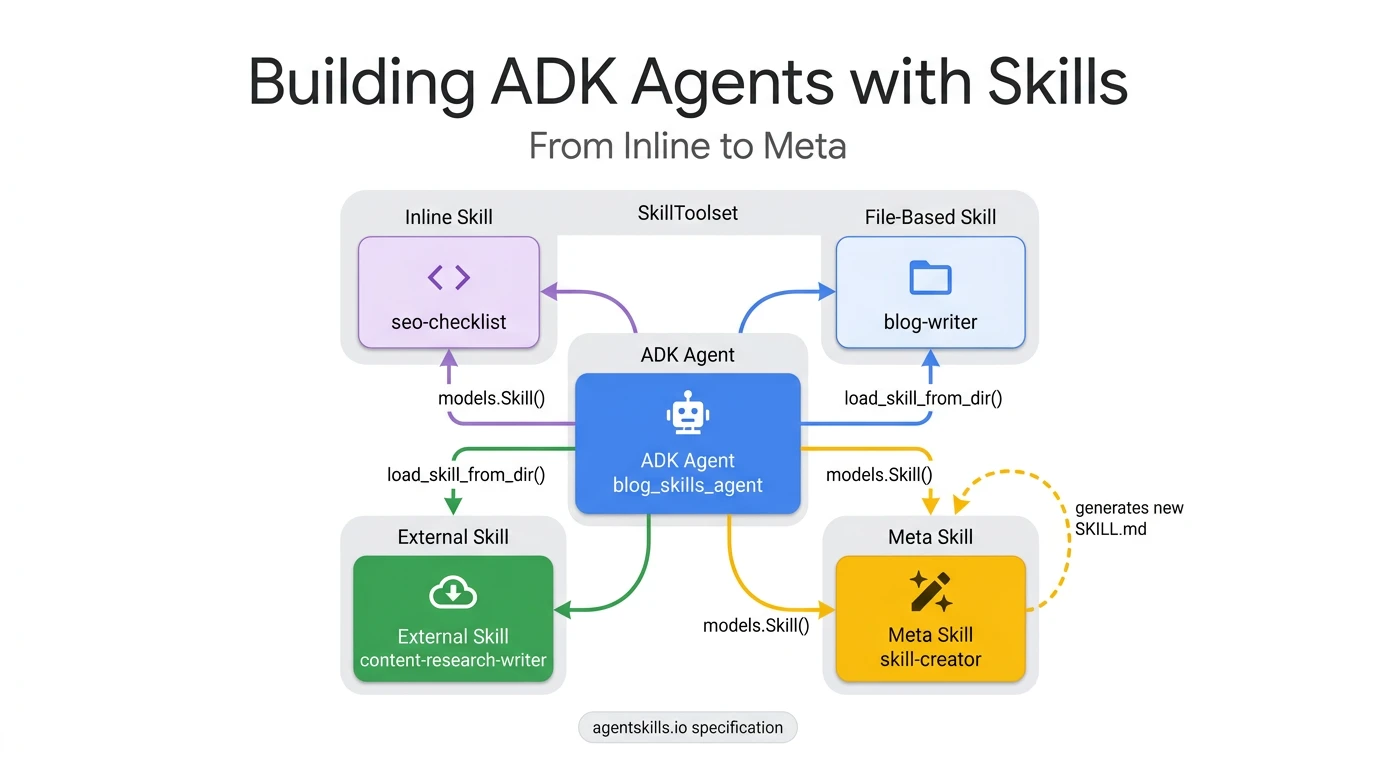
This is Part 1 of a 3-part series on building ADK agents with reusable skills.
I’d been hearing about Agent Skills for weeks — the idea of giving agents modular knowledge they load on demand instead of cramming everything into a system prompt. I’d even used a few with Gemini CLI. But scrolling through tutorials and X threads, I kept hitting the same question: how far can this pattern actually go with Google’s Agent Development Kit (ADK)?
The Agent Skills format was originally developed by Anthropic , released as an open standard , and has been adopted by a growing list of agent products — Claude Code, GitHub Copilot, Cursor, Gemini CLI, OpenAI Codex, and many more . Google publishes official ADK development skills that teach coding agents how to write ADK code — the same SKILL.md format powering both the development and runtime sides of the ecosystem. One take captured the momentum : “SaaS is being replaced by SKILL.md files” — 562 reactions on X.
My first thought was whether Skills are just another take on MCP . Reading through the agentskills.io overview , the distinction became clear. MCP gives agents access to external tools and data — it’s the connectivity layer. Skills teach agents what to do with those tools. MCP is “how to call a weather API.” A skill is “when the user asks about travel, check weather, compare destinations, and format as an itinerary.” You need both, and they compose naturally .
ADK adopted the same agentskills.io specification with its own Skills integration . I had a use-case sitting right in front of me: a blog-writing agent that could apply SEO checklists, follow style guides, and generate new capabilities on demand, without burning 5,000 tokens of context on every LLM call.
By the end of this post, you’ll know how to:
- Explain progressive disclosure and why it’s better than stuffing everything into a system prompt
- Set up an ADK project with the skills directory structure and imports
- Define inline skills directly in Python for simple, stable rules
Tip
- Progressive disclosure loads agent knowledge in three levels (L1 metadata → L2 instructions → L3 resources), fetching each only when needed
- An agent with 10 skills starts each call with ~1,000 tokens of L1 metadata instead of ~10,000 tokens in a monolithic system prompt
- ADK’s
SkillToolsetauto-generates three tools (list_skills,get_skill_details,load_skill_resource) from any collection of SKILL.md files- Inline skills are the simplest pattern — a Python dict with
name,description, andinstructionskeys
What Are Skills and Why They Matter
Progressive disclosure is a design pattern defined in the Agent Skills specification where an agent loads knowledge in three levels — lightweight metadata (L1), full instructions (L2), and reference files (L3) — fetching each level only when needed instead of loading all instructions into every LLM call.
The typical way to give an agent domain knowledge is to pack everything into the system prompt. Compliance rules, style guides, API references, troubleshooting procedures — all of it concatenated into one massive instruction string. This works fine when you have two or three capabilities. At ten, the system prompt is burning through thousands of tokens on every single LLM call, whether the user’s question is relevant to those instructions or not.
Skills solve this with progressive disclosure — a design pattern defined in the Agent Skills specification. Instead of loading everything upfront, the agent sees only a lightweight listing of skill names and descriptions. When the agent decides a skill is relevant to the current query, it explicitly loads that skill’s full instructions. If the skill references detailed documentation or templates, the agent fetches those on demand too. The spec defines three levels:
- L1 — Metadata (~100 tokens per skill): The
nameanddescriptionfields from SKILL.md frontmatter. Loaded at startup for all skills. This is the “menu” the agent scans to decide what’s relevant. - L2 — Instructions (<5,000 tokens recommended): The full SKILL.md body. Loaded only when the agent activates a specific skill.
- L3 — Resources (as needed): Files in
references/,assets/, orscripts/. Loaded only when the skill’s instructions reference them.
Here’s what that looks like in practice. Say you ask the agent “Review my blog post for SEO.” With the system-prompt approach, the agent already has all skill instructions in context — SEO rules, style guides, research methodology, skill-creation templates — whether it needs them or not. With progressive disclosure, the flow is different:
L1 — The agent scans the skill listing (always present, ~400 tokens for 4 skills):
seo-checklist: SEO optimization checklist for blog posts. Covers title tags, meta descriptions...
blog-writer: Blog post writing skill with structure templates and style guidelines...
content-research-writer: Creates research-based content with SEO optimization...
skill-creator: Creates new ADK-compatible skill definitions from requirements...
L2 — The agent calls load_skill("seo-checklist") (~300 tokens loaded on demand):
When optimizing a blog post for SEO, check each item:
1. Title: 50-60 chars, primary keyword near the start
2. Meta description: 150-160 chars, includes a call-to-action
3. Headings: H2/H3 hierarchy, keywords in 2-3 headings
...
L3 — If the skill references a file, the agent calls load_skill_resource (loaded only if needed):
load_skill_resource("seo-checklist", "references/seo-guidelines.md")
→ Returns the full SEO guidelines document
The three other skills stayed at L1 — the agent never loaded their instructions because it recognized the query was about SEO, not writing or research. To illustrate the savings: an agent with 10 skills, each averaging 1,000 tokens of instructions, would consume ~10,000 tokens in a system prompt on every call. The same agent using progressive disclosure starts each call with ~1,000 tokens of L1 metadata, then loads only the skill it needs. The exact savings depend on skill count and how often each skill is activated, but the pattern consistently keeps the baseline context small.

System prompt approach loads all skill instructions on every call. Progressive disclosure starts with L1 metadata and loads L2/L3 only when needed. Token estimates based on the agentskills.io specification ranges.
ADK implements this through the SkillToolset
class,
EXPERIMENTAL
introduced in ADK Python v1.25.0
. SkillToolset wraps one or more skills into three auto-generated tools — list_skills, load_skill, and load_skill_resource — that map directly to L1, L2, and L3. The rest of this series builds a blog-writing agent that uses all three levels across four skill patterns.
ADK Project Setup
The agent we’re building uses a single agent.py with four skills wired into one SkillToolset
. Each pattern trades simplicity for reusability, and they’re ordered so that each one picks up where the previous one hits a ceiling.
| Pattern | Source | Use Case | Trade-off |
|---|---|---|---|
| Inline | Python code | SEO checklist — stable rules that rarely change | Simplest to write, but locked to this agent |
| File-based | Local directory | Blog writer — instructions + a style guide reference | Reusable across agents, needs a directory |
| External | Community repo | Content researcher — downloaded from awesome-claude-skills | Portable across any agent that follows the spec |
| Meta | Inline + references | Skill creator — generates new SKILL.md files on demand | Self-extending agent, most complex to design |
The progression tells a story. Inline skills are 10 lines of Python — fast to write, but the knowledge lives only in your code. File-based skills move the knowledge to a directory with SKILL.md and reference docs, making it reusable. External skills take that same directory format from someone else’s repo. And meta skills close the loop: the agent writes new SKILL.md files itself, following the same spec.
This post covers the first pattern. Parts 2 and 3 build the remaining three.
Project Structure
The official skills_agent sample uses this layout. Our blog-writing agent follows the same pattern.
app/
├── __init__.py
├── agent.py
├── .env
├── requirements.txt
└── skills/
    ├── blog-writer/
    │   ├── SKILL.md
    │   └── references/
    │       └── style-guide.md
    └── content-research-writer/
        ├── SKILL.md
        └── references/
            └── seo-guidelines.md
The skills/ directory holds the file-based and external skills. Inline and meta skills are defined directly in agent.py — no directories needed.
Imports and Dependencies
The skill imports come from three modules.
# agent.py
import pathlib

from google.adk import Agent
from google.adk.skills import load_skill_from_dir
from google.adk.skills import models
from google.adk.tools.skill_toolset import SkillToolset
models— Classes for defining skills in code:Skill,Frontmatter,Resourcesload_skill_from_dir— Reads a skill from a directory on disk (SKILL.md + references)SkillToolset— Packages one or more skills into a toolset the agent can call
Note
Some external sources show
from google.adk.tools.skill import SkillToolset. Both import paths work, butfrom google.adk.tools.skill_toolset import SkillToolsetis the canonical one in the ADK source .
Set your GOOGLE_API_KEY in a .env file in the app/ directory before running. Install dependencies with pip install google-adk python-dotenv.
The skeleton is ready. The next section builds the first skill pattern — the simplest of the four.
Pattern 1: Inline Skills
An inline skill is the simplest Agent Skills pattern — a Python dictionary defined directly in your agent code with name, description, and instructions keys, ideal for small, project-specific knowledge that doesn’t need external files.
The SEO checklist from the ADK Project Setup table is the simplest case — stable rules that rarely change, defined directly in Python as an inline skill .
# agent.py — Pattern 1: Inline Skill
seo_skill = models.Skill(
    frontmatter=models.Frontmatter(
        name="seo-checklist",
        description=(
            "SEO optimization checklist for blog posts. Covers title tags,"
            " meta descriptions, heading structure, keyword placement,"
            " and readability best practices."
        ),
    ),
    instructions=(
        "When optimizing a blog post for SEO, check each item:\n\n"
        "1. **Title**: 50-60 chars, primary keyword near the start\n"
        "2. **Meta description**: 150-160 chars, includes a call-to-action\n"
        "3. **Headings**: H2/H3 hierarchy, keywords in 2-3 headings\n"
        "4. **First paragraph**: Primary keyword in first 100 words\n"
        "5. **Keyword density**: 1-2%, never forced or awkward\n"
        "6. **Paragraphs**: 2-3 sentences max, use bullet lists often\n"
        "7. **Links**: 2-3 internal + 3-5 external to authoritative sources\n"
        "8. **Images**: Alt text with keywords, compressed, descriptive names\n"
        "9. **URL slug**: Short, keyword-rich, hyphenated\n\n"
        "Review the content against each item and suggest specific improvements."
    ),
)
The three fields map to the progressive disclosure levels from the previous section:
frontmatter(L1) —Frontmatterrequires two fields, both defined in the agentskills.io spec :name— kebab-case, max 64 characters. Must match the directory name for file-based skills.description— max 1024 characters. This is what the LLM sees during L1 discovery — it decides whether to load the skill based on this text alone. The spec recommends including “specific keywords that help agents identify relevant tasks.” “SEO optimization checklist for blog posts” tells the agent exactly when this skill is useful. “A helpful skill” does not.
instructions(L2) — The actual knowledge the agent receives when it callsload_skill("seo-checklist"). For this checklist, nine rules in a numbered list is all the agent needs.resources(L3, optional) — Reference files embedded as Python strings. Inline skills can attach these for detailed docs, but for a simple checklist, instructions alone are enough. Pattern 4 (in Part 3) uses this to embed the agentskills.io spec itself.
When I asked the agent “Can you review my blog post for SEO?”, it loaded the seo-checklist skill and applied each item systematically.

The agent calls load_skill(“seo-checklist”) to retrieve the inline skill’s L2 instructions, then applies each checklist item to the blog post.
Inline skills work best for simple, stable rules that don’t need external files. If your skill’s instructions grow beyond a few hundred words, or you need to reference detailed documentation, a file-based skill is a better fit.
Next: File-Based and External ADK Skills
We’ve covered the conceptual foundation — what progressive disclosure is, why it matters, and how ADK’s SkillToolset implements it — and built the simplest pattern: an inline skill defined entirely in Python.
In Part 2, we move beyond Python strings into real file-based skills with reference documents, external skills from community repos, and wire everything into a working agent with SkillToolset. We’ll also look under the hood at the three auto-generated tools and see multi-skill loading in action. This post is part of the full Agent Engineering series
. For more on ADK
, check the tag archive.
Continue to Part 2: File-Based, External Skills, and SkillToolset Internals →
Frequently Asked Questions
What is the difference between MCP tools and Agent Skills? MCP (Model Context Protocol) tools give agents the ability to do things — call APIs, query databases, execute code. Agent Skills give agents knowledge — domain expertise, guidelines, and reference material loaded on demand. They are complementary: an agent uses MCP tools for actions and skills for knowledge.
What are the three levels of progressive disclosure in ADK? Level 1 (L1) is lightweight metadata — just the skill name and description, loaded into every call (~100 tokens per skill). Level 2 (L2) is the full instruction set, loaded only when the agent decides it needs that skill. Level 3 (L3) is supplementary resources like style guides or API references, loaded only for specific subtasks.
How many tokens does progressive disclosure save? For an agent with 10 skills, a monolithic system prompt approach uses approximately 10,000 tokens per call. With progressive disclosure, the agent starts with only ~1,000 tokens of L1 metadata and loads L2/L3 content on demand, reducing baseline context by roughly 90%.
When should I use inline skills vs file-based skills? Use inline skills for small, project-specific knowledge that won’t be reused elsewhere (e.g., a single SEO checklist). Use file-based skills when the knowledge is reusable across projects, needs supplementary files (L3 resources), or should be version-controlled independently.
What are ADK Core Skills?
ADK Core Skills are official skills
published by Google that teach coding agents (Gemini CLI, Claude Code, Cursor) how to write ADK code. They use the same SKILL.md format and progressive disclosure pattern as SkillToolset — the Tool Wrapper pattern covered in the Design Patterns post
. Install them with npx skills add google/adk-docs -y -g.
References
- Skills for ADK Agents — Official ADK documentation for SkillToolset and progressive disclosure
- Agent Skills Specification — The open standard defining SKILL.md format
- What Are Agent Skills? — Conceptual overview of skills as reusable, agent-agnostic capabilities
- agentskills/agentskills — Open-source specification repo and reference library
skills/models.py—Skill,Frontmatter,Resourcesclass definitionsskills_agentsample — Official ADK sample with inline + file-based skills- @liamottley_ — “SaaS is being replaced by SKILL.md files” — 562 reactions
- @Pavan_Belagatti — MCP vs Skills — Clear MCP/Skills differentiation
- ADK Core Skills — official skills for building ADK agents
Companion Repository
Clone the repo and run the inline skill pattern with adk web .
ADK Skills Documentation
Official guide for SkillToolset, progressive disclosure, and skill loading
Agent Skills Specification
The open standard adopted by 30+ agents for the SKILL.md format
